
Configuring suggestions
The Suggestions page (Home / Suggestions) offers each salesperson a single list of accounts to act on, ranked by priority. An account appears in it through signals: each signal is detected by an indicator (contacts to call back, accounts losing revenue, business whose decision date is approaching, and so on) on the account or on one of its contacts, businesses or appointments.
As an administrator, you can:
- choose the signals that feed the list;
- set the weight of each signal in the ranking;
- adjust the criteria of each indicator for the whole company;
- customize the prompts of the AI that prioritizes the list and suggests the next actions.
The Administration / Customization / Suggestions menu is only visible to authorized users.
Signals
In Administration / Customization / Suggestions, the indicators are grouped into three sections: Accounts, Contacts and Businesses and appointments. Signals from contacts, businesses and appointments are attached to the account concerned.
For each indicator:
- the switch enables or disables the signal;
- the Weight field (from 1 to 5) sets its importance in the ranking, regardless of its position on the page;
- the gear icon opens its criteria (see below).
Each change to activation or weight is saved immediately. Reset returns, after confirmation, to the six signals offered by default with their default weight.
Account ranking
Each signal gives the account a number of points equal to its weight. This weight is slightly reduced for the last items returned by an indicator: the first item counts in full, the last one counts for half. An account's score is the sum of its signals; the top 50 accounts are offered.
Default weights:
| Weight | Indicators |
|---|---|
| 3 | Businesses past decision date, Business with approaching decision date, Accounts with deadline, Dormant customers |
| 2 | Accounts with declining revenue, Accounts with declining margin, Lost product families, Priority accounts, Hot prospects, Contacts losing relationship, Stagnant businesses, Contacts to call |
| 1 | Accounts with potential, Not visited accounts, Under-visited accounts, Lost products, Growing accounts, Appointments without minutes |
Each active signal is calculated every time the page is displayed. Only enable the signals that are useful to your teams: the page stays faster and the list more relevant.
Configuring an indicator
An indicator's gear icon opens its criteria, with a description of the rule applied at the top:
- Modify the desired values (thresholds, durations, period…).
- Apply to save.
- Reset to return to the original values.
The values entered here apply to the whole company.
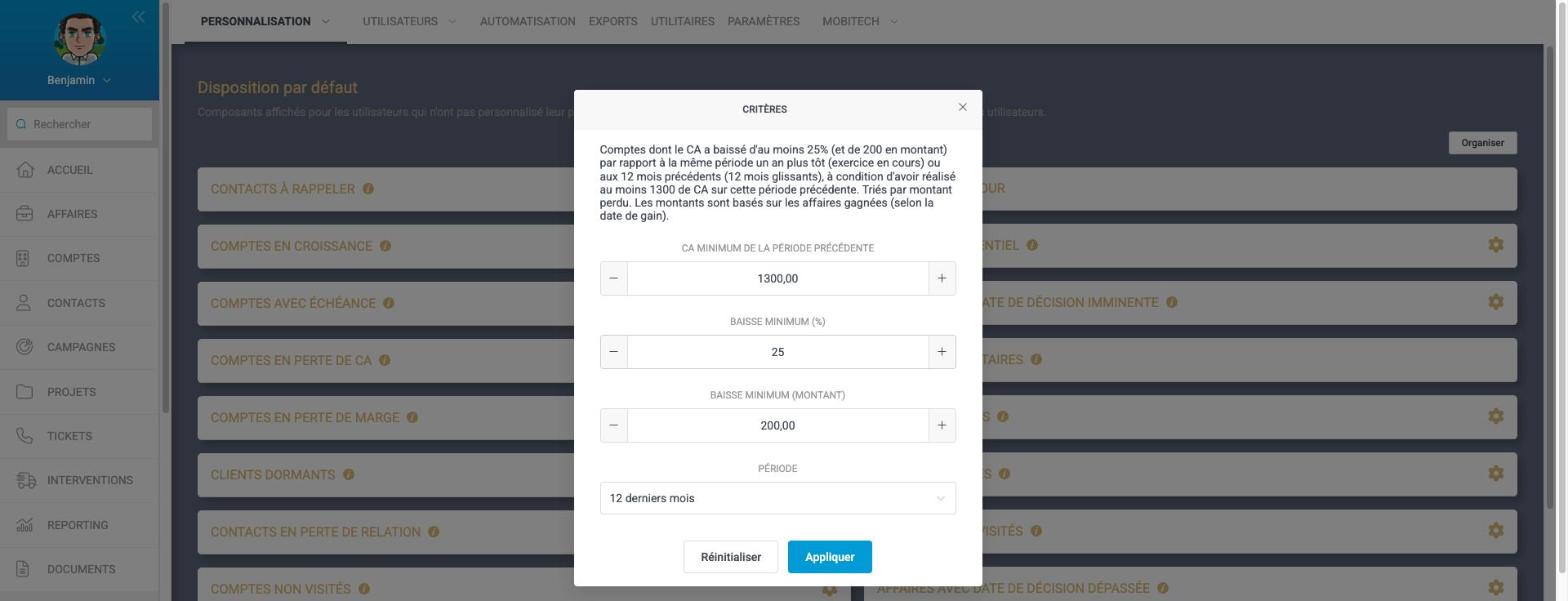
The description displayed (as well as each indicator's tooltip) is updated with the current values, so you can check the rule applied at a glance.
Revenue source
Indicators that compare amounts (revenue loss, growth, margin loss, dormant customers, lost product families or products) use the revenue source configured for the company (Administration / Settings / Default source of account revenue): won business (based on their win date) or invoiced revenue (account revenue). The component description specifies the source used.
Account potential
The "Accounts with potential" and "Priority accounts" indicators are based on each account's revenue potential (P1, P2…), which can be modified in Administration / Customization / Account Potentials. See Suggestions.
Available indicators
The values below are the default values.
Accounts
| Indicator | What it detects | Criteria (default value) |
|---|---|---|
| Accounts with declining revenue | Drop in revenue compared with the previous period, sorted by amount lost | Minimum revenue in the previous period (1,000), minimum drop in % (20) and in amount (0), period |
| Accounts with declining margin | Drop in margin compared with the previous period | Minimum margin in the previous period (500), minimum drop in % (20) and in amount (0), period |
| Growing accounts | Revenue growth compared with the previous period | Minimum revenue in the previous period (500), minimum growth in % (30), period |
| Dormant customers | Accounts with no revenue for several months although they were active | Months without revenue (3), minimum months of activity in the previous year (3), minimum revenue in the previous year (1,000) |
| Lost product families | Accounts that have stopped buying from a product family | Period (last 12 months), minimum product family revenue in the previous period (500) |
| Lost products | Accounts that have stopped buying a product | Period (last 12 months), minimum product revenue in the previous period (500) |
| Under-visited accounts | Visits made below the visit target | Period, minimum gap from the target in % (30), only my visit objectives (yes) |
| Not visited accounts | Active accounts with no recent visit and no planned visit | Months since the last visit (12), months before the next planned visit (3) |
| Accounts with potential | Actual revenue below the potential expected to date | Revenue threshold relative to the expected potential in % (80) |
| Priority accounts | Priority accounts whose revenue is below their target | No criteria |
| Accounts with deadline | Accounts with an ongoing business whose deadline is near | Past months (2), upcoming months (2) |
| Hot prospects | Prospects with no ongoing business visited several times recently | Minimum number of visits (2), period in months (3) |
Contacts
| Indicator | What it detects | Criteria (default value) |
|---|---|---|
| Contacts to call | Contacts not visited for a long time, or linked to a business whose deadline is approaching | Months since the last visit (12), months before the next planned visit (3), business deadline: past days (14) and upcoming days (7) |
| Contacts losing relationship | Drop in the number of visits compared with the previous window | Window in months (6), minimum drop in % (50), minimum visits in the previous window (2) |
Business and activity
| Indicator | What it detects | Criteria (default value) |
|---|---|---|
| Business with approaching decision date | Ongoing business whose expected signing date is approaching or has passed | Days before the decision date (14) |
| Businesses past decision date | Ongoing business whose expected signing date has passed | Minimum amount (0), maximum delay in days (365; 0 = no limit) |
| Stagnant businesses | Business with no state change, appointment or minutes | Days without change or activity (30), minimum amount (0) |
| Appointments without minutes | Your completed appointments without minutes | Delay before suggestion in days (2), maximum age in days (30) |
Only active accounts and contacts are taken into account. To remove an account or contact from the suggestions, set it to the INACTIVE state.
Choosing the period
Depending on the indicator, the period can be:
- Financial year to date: since the start of the financial year, compared with the same period one year earlier;
- Last 12 months: rolling 12 months, compared with the previous 12 months;
- Last 3 or 6 months (under-visited accounts only).
AI suggestions
Two features rely on AI. They consume the company's AI credits.
Prioritize with AI
The Prioritize with AI button analyzes the first 25 accounts in the list, their signals and excerpts from their latest visit reports. The AI places at the top the (up to) 7 accounts it is most useful to act on today, gives a short reason and a next action for each one, and summarizes the day's priorities.
The prioritization is kept for the day, the set of filters and the current signals; the Regenerate button lets you request a new one. Changing the signals or their weight triggers a new prioritization.
Next action
On a suggested account, the dedicated icon asks the AI to suggest the next action to take. The AI takes into account the account's signals, its latest minutes and its custom fields.
Modifying the prompts
The instructions given to the AI are modified in Administration / Settings / AI parameters:
- Suggestions AI Briefing Prompt (list prioritization);
- Suggestions AI Next Action Prompt.
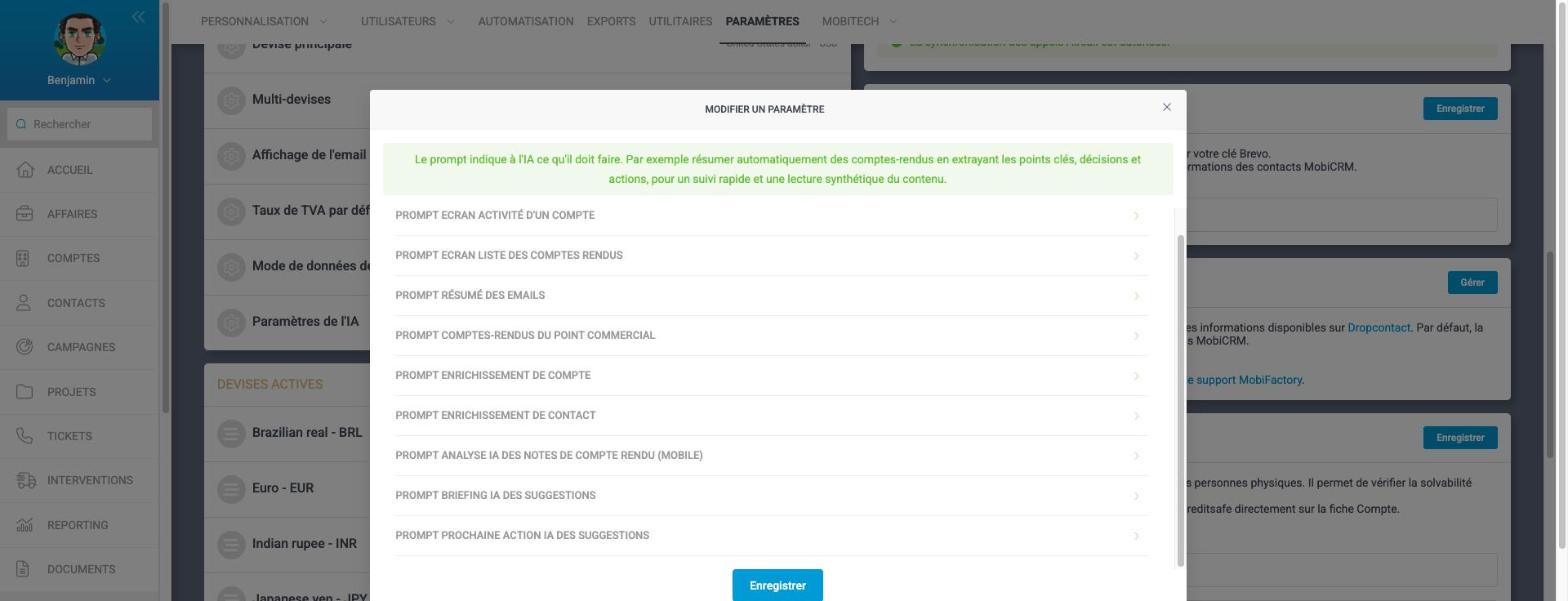
A prompt describes to the AI what it must produce and in what form. Modify it to adapt the tone, language or priority criteria to your business.
Tips
- Start with a few well-chosen signals: a list built on 4 to 6 signals is easier to read and faster.
- Give a high weight to urgent signals (overdue business, dormant customers) and a low weight to opportunity signals.
- If an indicator returns too many items, raise its thresholds (minimum amount, minimum drop, duration); if it returns none, relax them.
- Adapt the periods to your sales cycle: rolling 12 months for regular sales, financial year to date for tracking aligned with your budget.